Available on the Unity Asset Store
If the Inspector can’t show it, UDB can.
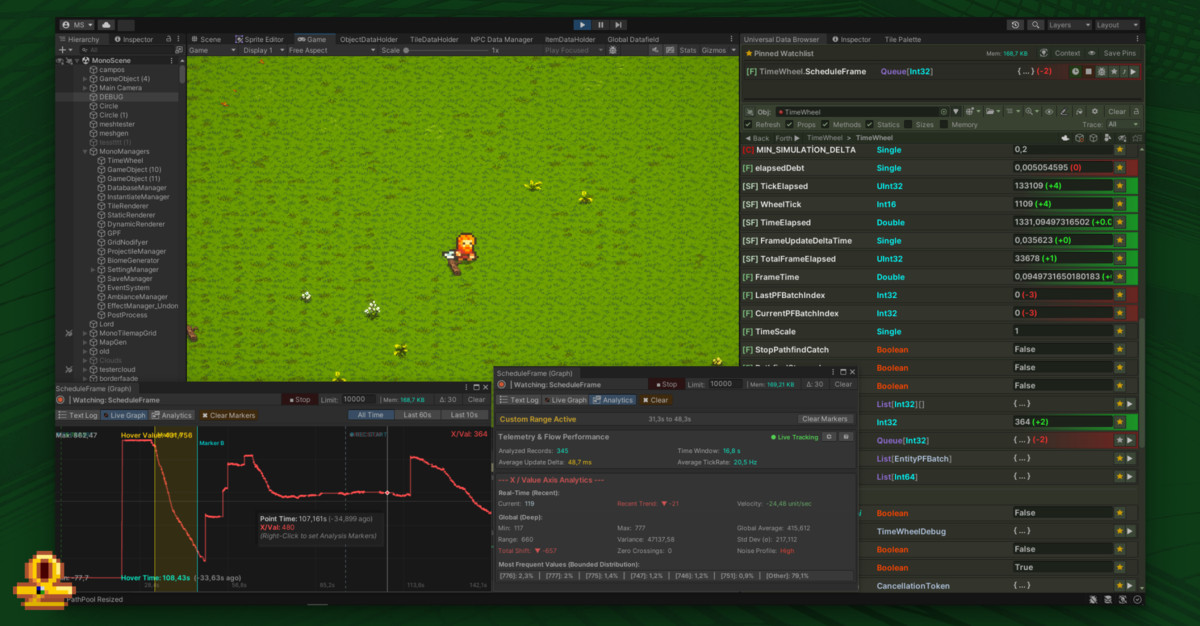
Universal Data Browser (UDB)Open private fields and nested collections, pin values to watch them change, and bookmark the paths you keep coming back to.
I’m the developer behind DeadBeak. When my game needs a tool Unity doesn’t have, I build it, then share it with other Unity developers.
Tools for Unity
Two Unity tools, both built while making a game. UDB is on the Asset Store; UQL is in development.
Open private fields and nested collections, pin values to watch them change, and bookmark the paths you keep coming back to.
Three UQL commands
// Ask your project a question.
SCAN → Find the state
OBSERVE → Capture it
CHECK → Compare the result

Save the script. Run it again.Query your Unity project and save the checks you want to run again. Your development agent can use the same language to investigate alongside you.
UQL is meant for the full UDB package.
Games
Both tools came out of one game. It’s still in development, and it hasn’t been announced.
In development
UDB and UQL are built alongside this game. The tools look inside it, and the game keeps handing them new questions.
No title reveal yet.
You’ll hear about it when it’s ready.
I needed to see what my game was doing. Its data had grown big and tangled, and every new structure meant writing another custom editor. After a few of those, I wanted one window that could browse all of it without a new interface every time.
That led me to C# reflection, and from there to Universal Data Browser. It grew from a way to look inside my own game into a tool for following nested values, watching them change and bookmarking the paths I needed. Then I shared it with other Unity developers stuck on the same problem.
I’m still building that game, and it keeps asking for tools. UQL is the next one: it turns the questions and checks I keep repeating into scripts I can run again.
Documentation
Start with a walkthrough, or jump straight to a feature or command.
Questions or feedback?
Need help, or want to talk about what you’re making? Write to me.